
Why Business Analysts Need a Dedicated Pricing Dashboard
Spreadsheet-based competitor tracking breaks down once your catalog exceeds 100 SKUs. Manual price checks across 10 competitors and three marketplaces generate thousands of data points per cycle, far too many for pivot tables and conditional formatting to handle effectively.
According to Forrester's 2025 Pricing Technology Survey, 72% of mid-market ecommerce companies have adopted or are evaluating dedicated pricing dashboards, up from 38% in 2022. The acceleration reflects a market reality: pricing windows in competitive categories now close within hours, not days.
McKinsey's pricing research consistently shows that a 1% improvement in price realization drives an 8-11% increase in operating profit. A well-built dashboard surfaces those 1% opportunities by making price gaps, competitor moves, and repricing windows visible in real time.
Gartner's 2025 Market Guide for Price Optimization notes that companies with centralized pricing visibility achieve 15-20% faster time-to-reprice compared to those relying on fragmented monitoring. For business analysts, the dashboard becomes the command center where competitive intelligence translates directly into revenue action.
Architecture Overview: The Five Layers of a Pricing Dashboard
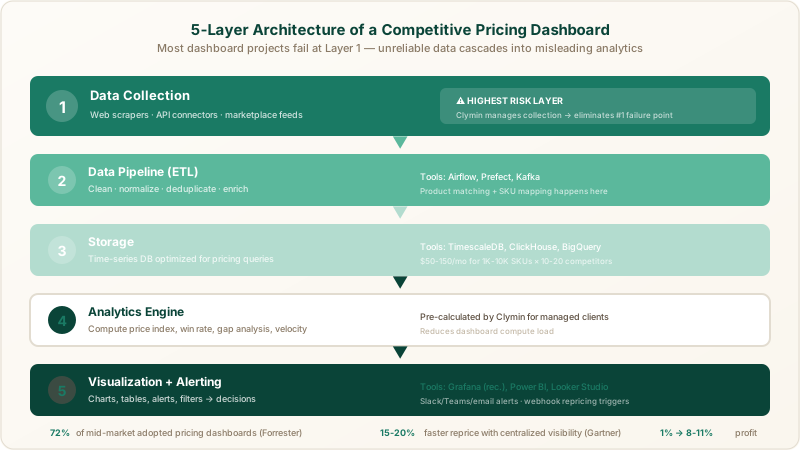
Before diving into tools and configurations, understanding the end-to-end architecture prevents costly rework. Every competitive pricing dashboard consists of five layers, each with distinct technology requirements and design considerations.
Layer 1, Data Collection: Web scrapers, API connectors, and marketplace feeds that gather raw competitor pricing data from target sources.
Layer 2, Data Pipeline: ETL processes that clean, normalize, and deduplicate raw data before storage. Product matching and SKU mapping happen here.
Layer 3, Storage: A database optimized for time-series pricing data with fast query performance for historical comparisons.
Layer 4, Analytics Engine: Calculation layer that computes KPIs like price index, win rate, and gap analysis from stored data.
Layer 5, Visualization: The dashboard interface where charts, tables, alerts, and filters present pricing intelligence to end users.
Most dashboard projects fail at Layer 1. Unreliable data collection cascades into inaccurate analytics and misleading visualizations. Getting the foundation right matters more than choosing the perfect charting library.
Step 1: Define Your Data Sources and Collection Strategy
Every pricing dashboard starts with a clear inventory of where competitor data lives. Business analysts should catalog every source before writing a single line of code or configuring any tool.
Identify Your Source Categories
Competitor pricing data typically comes from four source types:
- Direct competitor websites, Product detail pages, category listings, and promotional banners on competitor-owned ecommerce stores.
- Marketplaces, Amazon, Walmart, eBay, and niche vertical marketplaces where both you and your competitors sell.
- Price comparison aggregators, Google Shopping, PriceGrabber, and Shopzilla, which surface pricing from multiple sellers.
- MAP monitoring feeds, Manufacturer-provided pricing floors that help detect unauthorized discounting by resellers.
For each source, document the URL pattern, update frequency, and anti-bot complexity. Marketplace pages change pricing multiple times per day. Direct competitor sites may update weekly. Aggregators pull from cached data that can lag 24-48 hours behind reality.
Choose Your Collection Method
Three options exist for collecting competitor pricing data at scale:
Option A, Build in-house scrapers. Your engineering team writes and maintains custom scrapers using Scrapy, Playwright, or Puppeteer. Expect 3-6 months of development time, ongoing maintenance for anti-bot changes, and dedicated infrastructure costs. Suitable only if your team has deep scraping expertise and capacity.
Option B, Use off-the-shelf scraping tools. Platforms like Bright Data or Oxylabs provide proxy infrastructure and pre-built connectors. Reduces development time but still requires significant configuration, product matching logic, and monitoring effort from your team.
Option C, Use a managed scraping service. A provider like Clymin handles the entire data collection pipeline, scraper development, proxy rotation, anti-bot handling, data normalization, and delivery via API or database integration. Business analysts receive clean, structured data without needing engineering involvement.
For most business analyst-led dashboard projects, Option C eliminates the highest-risk variable in the architecture. Clymin's managed approach delivers structured pricing feeds that plug directly into your storage and visualization layers, cutting months off the project timeline.
Map Products Across Sources
Product matching is the most technically challenging part of data collection. The same product appears with different names, SKU formats, and identifiers across competitors and marketplaces.
Build a master product catalog with these fields: your internal SKU, UPC/EAN, product name, brand, category, and a list of matched competitor URLs per product. Clymin's product data extraction services include automated product matching using UPC codes, image recognition, and attribute-level comparison, significantly reducing manual mapping effort.
Start with your top 50-100 revenue-generating SKUs. Expand coverage incrementally as matching accuracy improves and dashboard usage patterns clarify which products need the closest monitoring.
Step 2: Design Your Data Pipeline and Storage
Raw scraped data requires transformation before dashboard consumption. Skipping the pipeline layer is the second most common failure point after unreliable data collection.
Build the ETL Pipeline
Your extract-transform-load pipeline should handle four transformation stages:
Cleaning, Remove HTML artifacts, normalize currency formats, strip shipping cost modifiers, and handle missing values. Price strings like "$29.99 (was $39.99)" need parsing into current price, original price, and discount percentage fields.
Normalization, Standardize units (per item vs. per pack), currency (USD, EUR, GBP), and tax inclusion conventions across sources. A 12-pack priced at $23.88 and a single unit at $1.99 represent the same per-unit economics but look very different in raw data.
Deduplication, Merge records from multiple scraping runs that captured the same product at the same price point. Retain only meaningful price changes to keep your time-series data manageable.
Enrichment, Add computed fields like price index (your price divided by competitor average), stock availability flags, and promotional tags that the analytics layer will consume.
For pipeline orchestration, Apache Airflow and Prefect are industry-standard choices for scheduled batch processing. For near-real-time pipelines, consider Apache Kafka or AWS Kinesis paired with lightweight transformation functions.
Select Your Database
Pricing data is inherently time-series, you care about both current values and historical trends. Choose a storage solution optimized for this access pattern:
- TimescaleDB, PostgreSQL extension purpose-built for time-series data. Excellent choice if your team already uses PostgreSQL. Handles millions of price records with fast aggregation queries.
- ClickHouse, Column-oriented database that excels at analytical queries across large datasets. Ideal for dashboards with heavy filtering and grouping operations.
- BigQuery or Snowflake, Cloud data warehouses suited for teams already invested in Google Cloud or AWS/Azure ecosystems. Higher per-query cost but zero infrastructure management.
For most mid-market ecommerce dashboards tracking 1,000-10,000 SKUs across 10-20 competitors, TimescaleDB on a single managed instance handles the workload comfortably at approximately $50-150 per month in cloud hosting costs.
Define Your Schema
A minimal pricing database schema needs four core tables:
products, Master catalog with your SKU, UPC, name, brand, category, and current retail price.
competitors, List of tracked competitors with name, website URL, marketplace presence, and scraping configuration metadata.
price_observations, The central fact table recording competitor_id, product_id, observed_price, original_price, currency, stock_status, timestamp, and source_url. Partition by date for query performance.
alerts_log, Records of triggered alert conditions with threshold, actual value, competitor, product, and notification status.
Step 3: Select KPIs and Metrics for Your Dashboard
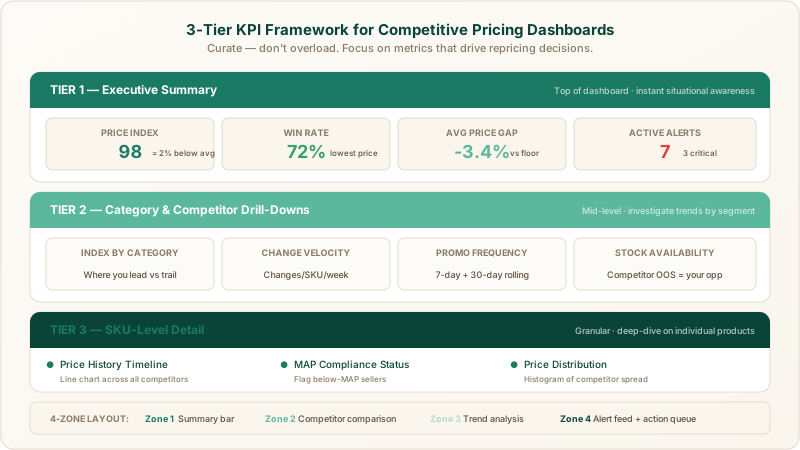
A dashboard crammed with every possible metric overwhelms users and delays decisions. Business analysts should curate a focused set of KPIs organized into three tiers.
Tier 1: Executive Summary Metrics
These appear at the top of the dashboard and provide instant situational awareness:
- Overall Price Index, Your average price divided by the competitor average, expressed as a percentage. A value of 98 means you are 2% cheaper than the market average.
- Win Rate, Percentage of tracked SKUs where your price is the lowest among all monitored competitors. Target depends on your brand positioning, value brands aim for 70%+, premium brands may target 30-40%.
- Average Price Gap, Mean percentage difference between your prices and the lowest competitor price across all tracked SKUs. Highlights how far your pricing deviates from the market floor.
- Alert Count, Number of active pricing alerts requiring attention, categorized by severity (critical, warning, informational).
Tier 2: Category and Competitor Drill-Downs
Mid-level metrics enable analysts to investigate trends by segment:
- Price Index by Category, Breaks down competitive positioning across product categories, revealing where you lead and where you trail.
- Competitor Price Change Velocity, Tracks how frequently each competitor adjusts prices, measured in changes per SKU per week. High-velocity competitors require closer monitoring.
- Promotional Frequency, Counts the number of active promotions per competitor over rolling 7-day and 30-day windows.
- Stock Availability Rate, Percentage of competitor SKUs currently in stock. Out-of-stock competitors create temporary pricing power for available sellers.
Tier 3: SKU-Level Detail
Granular metrics for deep-dive analysis:
- Price History Timeline, Line chart showing price movements for a specific SKU across all competitors over a configurable date range.
- MAP Compliance Status, Flags SKUs where any tracked seller prices below the manufacturer's minimum advertised price.
- Price Distribution Histogram, Shows the spread of competitor prices for a single SKU, revealing clustering patterns and outlier pricing.
Clymin's price intelligence services deliver pre-calculated metrics including price index, gap analysis, and competitor velocity scores, reducing the analytical computation your dashboard needs to perform.
Step 4: Build the Visualization Layer
With data flowing and KPIs defined, the visualization layer transforms numbers into decisions. Tool selection depends on your team's technical depth and organizational constraints.
Visualization Tool Comparison for Pricing Dashboards
Looker Studio (Google), Free, browser-based, and well-integrated with BigQuery and Google Sheets. Best for teams already using Google Cloud. Limitations include slower rendering with large datasets and limited custom visualization options.
Power BI (Microsoft), Strong choice for organizations using Azure or Microsoft 365. Handles large datasets well, offers rich DAX calculations, and provides robust row-level security. Per-user licensing ($10-20/month) adds up for large teams.
Grafana, Open-source, optimized for time-series data, and excellent for real-time monitoring dashboards. Pairs naturally with TimescaleDB and ClickHouse. Alerting capabilities are built-in and highly configurable. Requires more technical setup than Looker Studio or Power BI.
Streamlit or Dash (Python), Maximum flexibility for custom visualizations and complex analytical workflows. Ideal when your pricing logic requires Python libraries like pandas, numpy, or scikit-learn. Longer development time but no vendor lock-in.
For business analysts building their first competitive pricing dashboard, Grafana connected to TimescaleDB offers the strongest combination of real-time capability, built-in alerting, and cost efficiency. Teams already invested in Microsoft tooling should default to Power BI.
Dashboard Layout Best Practices
Organize your dashboard into four zones that mirror how analysts consume pricing intelligence:
Zone 1, Summary bar (top). Display 4-6 KPI cards showing overall price index, win rate, alert count, and total tracked SKUs. Color-code cards using green/amber/red thresholds so status is visible at a glance.
Zone 2, Competitor comparison (middle-left). A grouped bar chart or heatmap comparing your pricing against each competitor across top categories. Enable click-through to category-level detail.
Zone 3, Trend analysis (middle-right). Time-series line charts showing price index movement over 7, 30, and 90-day windows. Overlay competitor trend lines against your own pricing trajectory.
Zone 4, Alert feed and action queue (bottom). A sortable table of active alerts with columns for SKU, competitor, price change magnitude, timestamp, and recommended action. Include quick-action buttons for marking alerts as acknowledged or escalated.
Add global filters for date range, product category, competitor, and marketplace. Every chart should respond to filter changes instantly, slow filter performance kills dashboard adoption.
Step 5: Configure Alerting and Automated Responses
A dashboard that requires constant manual monitoring defeats its purpose. Alerting transforms your pricing dashboard from a passive reporting tool into an active decision-support system.
Define Alert Thresholds
Configure alerts for these high-impact pricing events:
- Price drop alert, A competitor reduces price by more than X% on a tracked SKU. Set X between 3-10% depending on your margin structure. Tighter margins warrant lower thresholds.
- New competitor alert, A previously untracked seller appears on a marketplace listing for one of your products. Early detection prevents unpleasant surprises.
- Stock-out opportunity, A major competitor shows out-of-stock status on a high-volume SKU. Temporary pricing power exists until they restock.
- MAP violation alert, Any tracked seller prices below the manufacturer's minimum advertised price. Relevant for brands that enforce MAP policies.
- Price parity breach, Your price on one channel diverges from your price on another channel by more than a set tolerance. Prevents channel conflict.
Notification Channels
Route alerts to the right people through the right channels:
- Slack or Microsoft Teams, Best for time-sensitive alerts requiring quick team discussion. Create dedicated channels like #pricing-alerts-critical and #pricing-alerts-info.
- Email digests, Aggregate non-urgent alerts into daily or weekly summary emails for stakeholders who need awareness without real-time interruption.
- PagerDuty or Opsgenie, Reserve for critical alerts on your top-revenue SKUs where a delayed response directly impacts revenue.
Grafana supports all three notification channels natively. Power BI requires Power Automate flows for Slack and PagerDuty integration. Looker Studio has limited native alerting, supplement with scheduled report emails.
Connect Alerts to Repricing Workflows
The highest-value dashboards close the loop between alert and action. When a competitor drops price on a key SKU, the alert should trigger a repricing workflow, not just a notification.
Integrate your alerting layer with your repricing tool (Feedvisor, Prisync, or a custom engine) via webhook or API call. Clymin's dynamic pricing data collection service provides real-time data feeds compatible with webhook-based repricing triggers, enabling automated responses to competitive price changes within minutes of detection.
Step 6: Operationalize and Iterate
Launching the dashboard is the beginning, not the end. Operational maturity develops through structured iteration and user feedback.
Establish a Review Cadence
Set recurring review sessions to keep the dashboard relevant:
- Daily standups (5 minutes), Review the alert queue and any overnight price changes requiring immediate action.
- Weekly pricing reviews (30 minutes), Analyze category-level trends, win rate changes, and competitor behavior patterns from the past seven days.
- Monthly strategy sessions (60 minutes), Evaluate whether tracked competitors, monitored SKUs, and alert thresholds still align with business priorities. Add or remove data sources as the competitive landscape evolves.
Monitor Dashboard Health
Track these operational metrics to ensure your dashboard stays reliable:
- Data freshness, Time since last successful data refresh per source. Stale data is worse than no data because users make decisions on outdated intelligence.
- Collection success rate, Percentage of scheduled scraping jobs that completed successfully. Drops below 95% indicate anti-bot challenges or site structure changes requiring attention.
- Query performance, Dashboard page load time. Anything above 5 seconds degrades user adoption. Optimize slow queries or add database indexes as data volumes grow.
Clymin monitors collection health proactively for managed scraping clients, resolving anti-bot blocks and site changes before they affect dashboard data freshness. Learn more about automated competitor price monitoring and how managed services maintain consistent data delivery.
Scale Incrementally
Resist the urge to track everything from day one. A phased scaling approach prevents overwhelm:
Month 1, Track top 100 SKUs against 5-8 primary competitors. Focus on getting Tier 1 KPIs accurate and alerts functional.
Month 2-3, Expand to 500 SKUs and 10-15 competitors. Add Tier 2 category-level metrics and promotional tracking.
Month 4-6, Scale to full catalog coverage. Introduce MAP monitoring, marketplace seller tracking, and historical trend analysis. Evaluate whether the visualization tool still meets performance requirements at scale.
Common Pitfalls and How to Avoid Them
Business analysts building their first pricing dashboard encounter predictable failure modes. Awareness of these pitfalls saves weeks of rework.
Pitfall 1, Starting with visualization instead of data quality. Choosing chart types before validating data accuracy leads to beautiful dashboards that display wrong numbers. Always validate data quality by comparing scraped prices against manual spot-checks on at least 50 SKUs before building any charts.
Pitfall 2, Ignoring product matching accuracy. A dashboard that incorrectly maps competitor product A to your product B generates misleading price comparisons. Invest in robust matching logic using UPC codes as primary identifiers, with name and attribute matching as fallbacks.
Pitfall 3, Setting too many alerts. Alert fatigue is real. Start with 5-10 high-impact alert rules and add more only when the team consistently acts on existing alerts. An alert nobody reads is worse than no alert.
Pitfall 4, Building on unreliable data collection. In-house scrapers that break every time a competitor updates their website create a maintenance burden that eventually kills the project. Managed scraping providers like Clymin absorb that maintenance, ensuring consistent data delivery regardless of site changes.
Pitfall 5, Neglecting user training. A dashboard is only valuable if people use it. Conduct hands-on training sessions, create a short video walkthrough, and designate a dashboard champion on the pricing team who fields questions and drives adoption.
Recommended Technology Stack for 2026
For business analysts building a competitive pricing dashboard in 2026, the following stack balances capability, cost, and maintenance burden:
| Layer | Recommended Tool | Alternative |
|---|---|---|
| Data Collection | Clymin managed scraping | Bright Data + custom scripts |
| Pipeline | Apache Airflow | Prefect |
| Storage | TimescaleDB | ClickHouse |
| Visualization | Grafana | Power BI |
| Alerting | Grafana Alerts | PagerDuty |
| Repricing Integration | Webhook API | Feedvisor / Prisync |
Total infrastructure cost for a mid-market implementation (1,000-5,000 SKUs, 10-15 competitors): approximately $500-1,500 per month excluding data collection fees. Clymin's managed scraping pricing scales based on data volume and refresh frequency, contact the team for a custom quote based on your specific competitive landscape.
Start Building Your Pricing Dashboard Today
Building a competitive pricing dashboard transforms scattered competitive intelligence into a structured decision-making system. The playbook outlined above, from data source mapping through alerting configuration, gives business analysts a clear path from concept to operational dashboard in 8-12 weeks.
The data collection layer determines whether the entire dashboard succeeds or fails. Clymin eliminates the highest-risk component by delivering clean, normalized, and reliable pricing data from any competitor source. With 100 billion+ data points collected across hundreds of projects, Clymin provides the foundation that makes every subsequent dashboard layer work.
Ready to power your pricing dashboard with reliable competitor data? Book a consultation with Clymin to discuss your competitive landscape, data requirements, and integration preferences. Your dashboard is only as good as the data feeding it, get the foundation right from the start.