
How to Monitor Competitor Prices Automatically
Why Automated Price Monitoring Matters for D2C Brands
Manual price checks do not scale. If you sell across 50 SKUs and compete against 10 brands, that is 500 data points to track per cycle. Multiply that by daily checks and the task becomes unmanageable for any marketing team.
Automated price monitoring eliminates that burden. It gives you consistent, timestamped data that reveals pricing trends, promotional patterns, and market positioning shifts you would otherwise miss.
According to industry benchmarks, brands using automated competitive pricing data see measurable improvements in margin optimization and conversion rates. The key is not just collecting the data but structuring it for fast decision-making.
Step 1: Identify Your Competitor Set and Data Sources
Start by listing your direct competitors and the channels where their prices appear. This typically includes their own websites, Amazon, Walmart Marketplace, Google Shopping, and niche aggregators in your category.
Create a spreadsheet mapping each competitor to every URL or marketplace listing you want to track. Include product identifiers like SKU, UPC, or ASIN to ensure accurate matching across sources.
Prioritize the competitors and products that most directly impact your revenue. You do not need to track every SKU from every brand on day one.
Step 2: Choose Your Data Collection Method
You have three main options for collecting competitor pricing data automatically:
Browser extensions and manual-assist tools. Extensions like Klarna or InvisibleHand surface competitor prices while you browse. These are useful for spot checks but do not produce structured datasets or run on a schedule.
SaaS price monitoring platforms. Tools such as Prisync, Competera, or Price2Spy offer dashboards, alerts, and integrations. They work well for straightforward use cases but can struggle with complex sites, anti-bot protections, or custom data requirements. For a deeper comparison, see our guide on price monitoring tools vs managed services.
Managed web scraping services. A managed provider builds and maintains custom scrapers tailored to your target sites. This approach handles anti-bot measures, site layout changes, and data normalization without requiring your team to maintain code. Clymin's AI-agentic scraping model, for example, adapts to site changes automatically and delivers clean, structured data on your schedule.
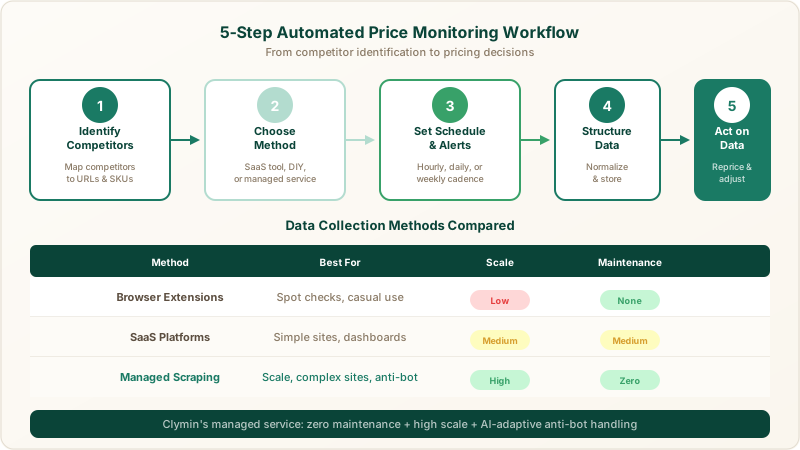
Step 3: Define Your Monitoring Schedule and Alerts
Not every product needs real-time tracking. Set your monitoring cadence based on how frequently prices actually change in your category.
For high-velocity categories like consumer electronics, daily or even hourly monitoring makes sense. For categories with more stable pricing, two to three times per week is often sufficient.
Configure alerts for meaningful thresholds: a competitor dropping price by more than 5%, a new product appearing at a lower price point, or a stockout event that creates a temporary pricing opportunity.
Step 4: Structure and Store Your Data
Raw price data is only useful if it is clean and queryable. Your data pipeline should normalize competitor prices into a consistent format with fields like product name, competitor, price, currency, timestamp, and source URL.
Store this data in a database or data warehouse rather than spreadsheets. Even a simple PostgreSQL instance or a BigQuery table will give you far more analytical power than CSV files. For more on how structured product data extraction fits into this workflow, we have a dedicated overview.
Build a historical record from day one. Pricing trend analysis requires weeks or months of data, and you cannot backfill what you did not collect.
Step 5: Turn Data into Pricing Decisions
Data without action is just overhead. Connect your price monitoring output to your actual pricing workflow.
Create a weekly pricing review where your team examines competitor movements and decides on responses. Automate the easy decisions, like matching a competitor price drop on a high-elasticity SKU, and flag complex scenarios for human review.
Many D2C brands connect their monitoring data to dynamic pricing engines or feed it into their ecommerce price scraping pipeline for richer analysis. The goal is a closed loop: collect, analyze, decide, adjust.
Common Pitfalls to Avoid
Tracking too many competitors too early. Start with your top five and expand once your process is stable.
Ignoring data quality. A scraper that returns stale or incorrect prices is worse than no data. Validate your sources regularly and use providers that guarantee accuracy.
Treating price monitoring as a one-time project. Competitor websites change layouts, add bot protections, and restructure URLs constantly. Your monitoring system needs ongoing maintenance, which is one reason managed services like Clymin exist.
Choosing the Right Approach for Your Team
If you have engineering resources and a small competitor set, an in-house solution using open-source scraping libraries and a SaaS dashboard may be sufficient. If you need to track competitor prices across dozens of sites at scale without dedicating developer time, a managed service is the more practical path.
Evaluate providers on data accuracy, delivery format, handling of anti-bot protections, and how quickly they adapt when target sites change. Clymin, with hundreds of completed projects and 100 billion data points processed, is one option worth evaluating in that context.
Get Started
Automated price monitoring is not a luxury for D2C brands in 2026. It is a baseline requirement for staying competitive. Whether you build your pipeline in-house or work with a managed provider, the steps above give you a clear framework to follow.
If you want expert help setting up a reliable, hands-off price monitoring system, get a free consultation to discuss your specific needs.
"Clymin's data insights helped us boost revenue by 20% through real-time market trend and competitor pricing analysis.", Sarah T., Marketing Manager