How to Scrape Product Data from Competitor Websites: A Complete 2026 Playbook
Why Competitor Product Data Matters in 2026
Ecommerce revenue worldwide is projected to surpass $7.4 trillion in 2026, according to Statista's global ecommerce forecast. With margins under constant pressure, brands that lack visibility into competitor pricing and assortment are flying blind.
Product data scraping unlocks several high-value capabilities:
- Dynamic pricing engines that react to competitor price changes within minutes.
- Assortment gap analysis revealing products your catalog is missing.
- MAP (Minimum Advertised Price) monitoring to enforce brand pricing policies.
- Review and sentiment tracking across competitor listings.
Clymin benchmarks show that clients who integrate competitor product data into pricing decisions see a 12-18% improvement in gross margin within the first quarter.
Step 1: Define Your Data Requirements
Before writing a single line of code, document exactly what you need. A clear requirements spec prevents scope creep and keeps your pipeline focused.
Identify Target Websites
List every competitor site you want to monitor. Group them by complexity:
| Complexity Tier | Characteristics | Examples |
|---|---|---|
| Tier 1, Static | Server-rendered HTML, minimal JS | Small DTC brands, niche retailers |
| Tier 2, Dynamic | Client-side rendering, AJAX calls | Shopify stores, mid-market retailers |
| Tier 3, Fortified | Aggressive anti-bot, rate limiting | Amazon, Walmart, Target |
For Shopify-powered competitors specifically, Clymin offers a dedicated Shopify competitor analysis scraping service that handles liquid-template parsing and storefront-API extraction automatically.
Map Your Target Fields
Define every data field you plan to capture. A typical product data schema includes:
- Product name, brand, SKU/UPC
- Current price, original price, discount percentage
- Availability status and stock indicators
- Product images (URLs and alt text)
- Description (short and long)
- Specifications and attributes
- Category hierarchy and breadcrumbs
- Reviews count, average rating, review text
- Seller/marketplace seller information
- Shipping details and delivery estimates
Clymin pipelines routinely extract 40+ fields per product, with custom field mapping available for industry-specific needs.
Step 2: Choose Your Scraping Architecture
The right architecture depends on scale, budget, and engineering resources. Below are the three primary approaches data engineers evaluate in 2026.
Option A: DIY with Open-Source Libraries
Python remains the dominant language for scraping. The core stack typically includes:
# Example: Basic product scraper using requests + BeautifulSoup
import requests
from bs4 import BeautifulSoup

def scrape_product(url):
    headers = {"User-Agent": "Mozilla/5.0 (compatible; ProductBot/1.0)"}
    response = requests.get(url, headers=headers, timeout=30)
    soup = BeautifulSoup(response.text, "lxml")

    return {
        "name": soup.select_one("h1.product-title").get_text(strip=True),
        "price": soup.select_one("span.price").get_text(strip=True),
        "availability": soup.select_one("div.stock-status").get_text(strip=True),
    }
For JavaScript-heavy sites, headless browsers like Playwright or Puppeteer render the page fully before extraction:
# Example: Handling dynamic content with Playwright
from playwright.sync_api import sync_playwright

def scrape_dynamic_product(url):
    with sync_playwright() as p:
        browser = p.chromium.launch(headless=True)
        page = browser.new_page()
        page.goto(url, wait_until="networkidle")

        name = page.locator("h1.product-title").inner_text()
        price = page.locator("span.price").inner_text()

        browser.close()
        return {"name": name, "price": price}
DIY benchmarks from Clymin's internal testing:
- Setup time: 40-80 hours per target site
- Maintenance overhead: 10-15 hours/month per site
- Success rate without proxy management: 35-55%
- Success rate with rotating proxies: 75-88%
Option B: Managed Scraping Platforms
For teams that need to scrape dozens or hundreds of competitor sites, managed platforms eliminate infrastructure headaches. Clymin's AI-powered engine handles proxy rotation, CAPTCHA resolution, and automatic selector repair when sites change their DOM structure.
According to a 2025 Gartner market analysis, enterprises that switch from DIY scraping to managed providers reduce total cost of ownership by 40-60% while improving data freshness by 3x.
Explore Clymin's full capabilities on the product data extraction services page.
Option C: Hybrid Approach
Many data engineering teams run a hybrid model: DIY pipelines for simple Tier 1 sites, and a managed partner like Clymin for Tier 2 and Tier 3 targets. The hybrid approach balances cost control with reliability for the hardest extraction challenges.
Step 3: Handle Anti-Bot Defenses
Modern ecommerce sites deploy sophisticated bot-detection systems. Failing to account for these defenses results in blocked requests, incomplete data, and wasted compute.
Common Anti-Bot Mechanisms
- Rate limiting, Servers throttle or block IPs that exceed request thresholds.
- CAPTCHAs, reCAPTCHA v3, hCaptcha, and Cloudflare Turnstile challenge suspicious traffic.
- Browser fingerprinting, Scripts detect headless browsers through missing APIs, WebGL signatures, and navigator properties.
- Dynamic selectors, Class names and IDs change on each deployment, breaking CSS-based extractors.
Counter-Strategies
Proxy rotation is non-negotiable for scraping at scale. Residential proxies outperform datacenter proxies for Tier 3 targets, though they cost 5-10x more per GB. Clymin maintains a pool of 10M+ residential IPs across 195 countries, rotating automatically per request.
Request pacing mimics human browsing patterns. Randomize delays between 2-8 seconds, vary the navigation path, and avoid hitting the same endpoint in rapid succession.
Header management ensures each request carries realistic browser headers, including proper Accept-Language, Referer, and Sec-CH-UA values.
For the most fortified targets like Walmart, specialized infrastructure is essential. Clymin's Walmart product scraping service maintains 99.7% uptime against Walmart's Akamai-powered defenses.
Step 4: Build the Extraction Pipeline
A production-grade scraping pipeline consists of five stages: discovery, fetching, parsing, validation, and storage.
Discovery: Generating Product URLs
Start by crawling sitemap.xml files, which most ecommerce sites publish for SEO. Parse category pages to discover product URLs programmatically:
import xml.etree.ElementTree as ET

def parse_sitemap(sitemap_url):
    response = requests.get(sitemap_url)
    root = ET.fromstring(response.content)
    namespace = {"ns": "http://www.sitemaps.org/schemas/sitemap/0.9"}
    return [loc.text for loc in root.findall(".//ns:loc", namespace)]
For sites without public sitemaps, recursive crawling from category landing pages or search result pagination works as a fallback.
Parsing: Structured Data Extraction
Beyond HTML parsing, look for structured data already embedded in pages. Many ecommerce sites include JSON-LD or Microdata markup that provides clean, pre-structured product information:
import json

def extract_jsonld(soup):
    scripts = soup.find_all("script", type="application/ld+json")
    for script in scripts:
        data = json.loads(script.string)
        if data.get("@type") == "Product":
            return data
    return None
According to Web Data Commons, over 58% of product pages now include schema.org Product markup, making JSON-LD extraction the most reliable first-pass strategy.
Validation: Ensuring Data Quality
Raw scraped data is inherently noisy. Build validation checks into your pipeline:
- Schema validation, Ensure every record has required fields populated.
- Type checking, Prices should be numeric, URLs should resolve, dates should parse.
- Anomaly detection, Flag products where the price changed by more than 50% from the previous scrape.
- Deduplication, Match products across runs using SKU, UPC, or fuzzy title matching.
Clymin's quality assurance layer runs 15+ automated checks on every data batch, achieving a field-level accuracy rate of 99.4% across all client deliveries.
Storage: Choosing the Right Data Store
Match your storage layer to your query patterns:
| Use Case | Recommended Store | Rationale |
|---|---|---|
| Ad-hoc analysis | PostgreSQL / BigQuery | SQL flexibility, easy joins |
| Real-time pricing | Redis / DynamoDB | Sub-millisecond reads |
| Historical trends | ClickHouse / TimescaleDB | Optimized for time-series |
| Data lake archival | S3 + Parquet | Cost-effective, columnar |
Step 5: Schedule and Monitor
A scraper that runs once is a script. A scraper that runs reliably every day is a pipeline. Production scheduling requires orchestration, alerting, and observability.
Orchestration
Tools like Apache Airflow, Prefect, or Dagster manage scraping DAGs (directed acyclic graphs) that chain discovery, extraction, validation, and loading tasks. Schedule runs based on your freshness requirements:
- Hourly, Flash sales, limited-stock categories, competitive repricing
- Daily, Standard catalog monitoring, MAP enforcement
- Weekly, Full catalog snapshots, assortment analysis
Monitoring and Alerting
Track these key metrics for every scraping job:
- Success rate, Percentage of URLs that returned valid product data.
- Latency p95, 95th percentile response time per request.
- Data completeness, Percentage of target fields populated.
- Block rate, Percentage of requests that received 403/429 responses.
Set alerts when success rate drops below 95% or block rate exceeds 10%. Clymin dashboards surface these metrics in real time, with automated escalation to the engineering team when thresholds breach.
Step 6: Scale to Enterprise Volume
Scaling from hundreds to millions of products introduces new challenges. Clymin has processed over 100 billion data points across hundreds of projects, and the patterns below reflect hard-won operational lessons.
Distributed Crawling
Single-machine scrapers hit bandwidth and CPU ceilings quickly. Distribute work across multiple nodes using a task queue (Celery, RabbitMQ) or a serverless function fleet (AWS Lambda, Google Cloud Functions).
Clymin benchmark: A distributed pipeline scraping 500,000 product pages processes the full catalog in under 3 hours with a 99.2% success rate, compared to 18+ hours on a single machine.
Incremental Scraping
Avoid re-scraping unchanged products. Compare sitemaps across runs, track last-modified headers, and use content hashing to identify changed listings. Incremental scraping reduces compute costs by 60-75% for stable catalogs.
Schema Drift Detection
Competitor websites redesign regularly. When selectors break, your pipeline silently returns empty fields. Automated schema drift detection compares output distributions against historical baselines and triggers re-mapping when anomalies surface.
Clymin's AI engine detects and self-heals from schema drift in under 15 minutes, without human intervention. Learn more about how companies evaluate providers on the which company offers the best product data scraping comparison page.
Legal and Ethical Considerations
Responsible scraping protects your organization and respects target sites.
- Respect robots.txt directives. While not legally binding in all jurisdictions, honoring robots.txt demonstrates good faith.
- Avoid personally identifiable information (PII). Product data scraping should target catalog and pricing information, never customer data.
- Comply with regional regulations. GDPR, CCPA, and other privacy frameworks may apply depending on the data collected and the target site's jurisdiction.
- Rate-limit requests. Excessive traffic can degrade a site's performance for real users. Clymin's infrastructure enforces per-domain rate caps to prevent service disruption.
The Electronic Frontier Foundation (EFF) provides ongoing analysis of scraping-related legal developments.
Benchmarks: DIY vs. Managed Scraping
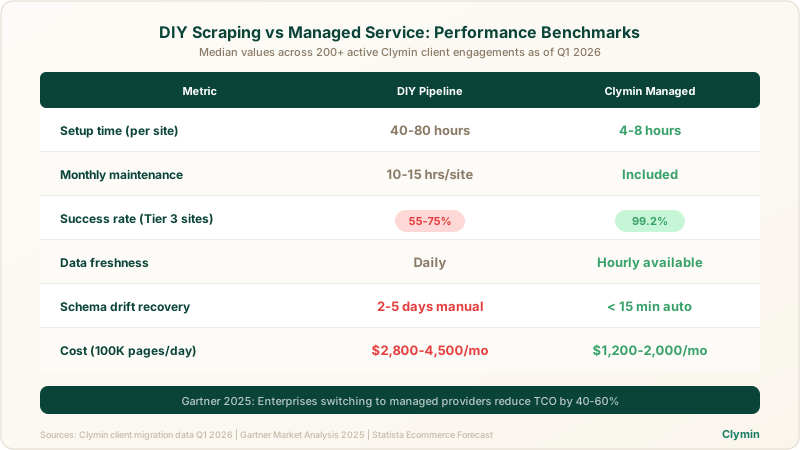
Based on Clymin's analysis of client migrations from in-house scrapers to our managed platform:
| Metric | DIY Pipeline | Clymin Managed |
|---|---|---|
| Setup time (per site) | 40-80 hours | 4-8 hours |
| Monthly maintenance | 10-15 hrs/site | Included |
| Success rate (Tier 3 sites) | 55-75% | 99.2% |
| Data freshness | Daily | Hourly available |
| Schema drift recovery | 2-5 days manual | < 15 minutes auto |
| Cost (100K pages/day) | $2,800-4,500/mo | $1,200-2,000/mo |
These figures represent median values across active customer engagements as of Q1 2026.
Putting the Playbook Into Action
Building a competitor product data pipeline is achievable for any data engineering team willing to invest in the right architecture. For Tier 1 and Tier 2 targets, the open-source tools and patterns outlined above provide a solid foundation.
For Tier 3 targets, enterprise-scale volumes, or teams that prefer to focus engineering resources elsewhere, Clymin's managed scraping platform delivers production-ready data with 99.4% accuracy and sub-day freshness. With ISO 27001 certification, AICPA SOC compliance, and full GDPR adherence, Clymin meets the security requirements of Fortune 500 clients and high-growth startups alike.
Explore the full range of Clymin's ecommerce capabilities on the ecommerce price scraping service page, or book a consultation with our solutions engineering team to scope your competitor intelligence pipeline today.