
Why Shopify Product Data Matters for Competitive Intelligence
Shopify powers over 4.6 million live stores globally, according to BuiltWith's 2025 platform usage data. Competitors, suppliers, and emerging D2C brands all operate on Shopify, making storefront data a critical input for pricing strategy, assortment planning, and market analysis.
Manual product monitoring across even a dozen Shopify stores becomes impractical within weeks. Prices change, variants get added, and new collections appear daily. According to a 2024 Statista report, the average ecommerce store updates pricing on 15-20% of its catalog every month.
Automated extraction solves the scale problem. A well-built Shopify scraping pipeline gives your team structured, timestamped product data you can feed directly into analytics dashboards, pricing engines, or data warehouses.
How to Access Shopify's Public Product JSON Endpoints
Every Shopify store exposes product data through built-in JSON endpoints that do not require authentication. Appending /products.json to any Shopify store domain returns a paginated list of products with full metadata.
Key endpoints data engineers should know:
{store-url}/products.json, returns all products, paginated (up to 250 per page){store-url}/products.json?page=2, pagination parameter for older cursor-less stores{store-url}/products/{handle}.json, returns a single product by its URL handle{store-url}/collections/{collection-handle}/products.json, returns products within a specific collection{store-url}/collections.json, lists all public collections in the store
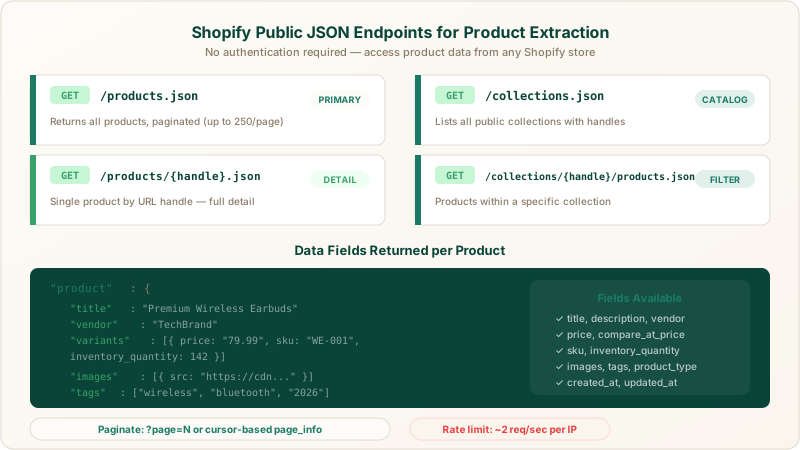
Shopify's public JSON endpoints expose product titles, variants, pricing, and inventory without authentication.
Each product object in the JSON response includes fields like title, body_html, vendor, product_type, tags, variants (with price, compare_at_price, sku, inventory_quantity), and images. Variant-level data is especially valuable for tracking size/color-specific pricing and stock levels.
How to Scrape Shopify Collections and Catalog Structure
Collections reveal how a store organizes and merchandises products. Extracting collection data helps you understand a competitor's category strategy, bestseller placement, and seasonal assortment changes.
Start by hitting {store-url}/collections.json to get a list of all public collections. Each collection object includes a handle field you can use to query its products via {store-url}/collections/{handle}/products.json.
Shopify sorts collection products by the store owner's chosen criteria, manual order, best-selling, price, or date. Capturing the sort order gives you insight into which products a competitor prioritizes. Products appearing first in a "best-sellers" collection directly signal demand ranking.
For stores with more than 250 products per collection, you need to paginate. Newer Shopify storefronts use cursor-based pagination with page_info parameters in the Link header, while older stores still support numeric ?page= pagination. Your extraction logic should handle both patterns.
How to Handle Rate Limits and Anti-Bot Protections
Shopify enforces rate limiting on storefront requests, typically allowing around 2 requests per second per IP address. Exceeding the threshold returns a 429 Too Many Requests response. According to Shopify's own developer documentation, aggressive request patterns can also trigger temporary IP bans.
Practical strategies for staying within limits:
- Request pacing. Add a 500-600ms delay between sequential requests to stay comfortably under the 2 req/s threshold.
- Exponential backoff. When you receive a 429 response, wait 2 seconds before retrying, then double the wait on consecutive failures.
- IP rotation. Distribute requests across multiple residential or datacenter proxies to avoid per-IP throttling.
- Session management. Reuse cookies and headers across requests to mimic normal browsing behavior and avoid triggering bot detection middleware.
Some Shopify stores deploy third-party bot detection apps like Kasada or DataDome. These apps analyze request fingerprints beyond simple rate limits. Handling them requires browser-level rendering or fingerprint rotation, which adds significant engineering complexity to a DIY pipeline.
Clymin's AI agents handle Shopify rate limits and bot detection adaptively, adjusting request pacing and fingerprints in real time across hundreds of target stores. For teams running large-scale ecommerce price scraping operations, offloading this complexity to a managed service avoids weeks of proxy infrastructure engineering.
What to Watch for With Shopify Liquid Templates
Not all product data is available through JSON endpoints. Some Shopify stores display custom fields, metafield values, review counts, or dynamic pricing only through their Liquid-rendered HTML pages. Liquid is Shopify's templating language, and store owners often add custom data to product templates that never appears in the JSON API.
Extracting Liquid-rendered data requires parsing the store's HTML rather than relying solely on JSON endpoints. Look for data- attributes, structured data in <script type="application/ld+json"> blocks, and custom Liquid objects injected into the page template.
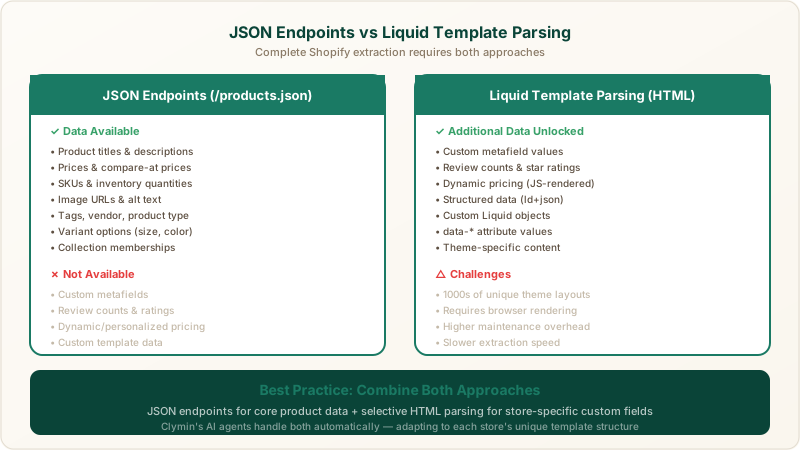
JSON endpoints provide core product fields, while Liquid template parsing unlocks custom metafields, reviews, and dynamic pricing data.
A robust Shopify extraction pipeline combines both approaches: JSON endpoints for core product and variant data, supplemented by selective HTML parsing for store-specific custom fields. Clymin's Shopify competitor analysis scraping service handles both data sources automatically, adapting to each store's unique template structure.
How to Structure and Store Extracted Shopify Data
Raw JSON responses from Shopify endpoints need normalization before they become analytically useful. Product variants, nested image arrays, and inconsistent tag formatting all require transformation.
Recommended schema for your data warehouse:
- Products table: product_id, title, vendor, product_type, created_at, updated_at, store_url
- Variants table: variant_id, product_id, sku, price, compare_at_price, inventory_quantity, option_1, option_2, option_3
- Images table: image_id, product_id, src_url, position, alt_text
- Collections table: collection_id, handle, title, sort_order, store_url
- Extraction metadata: extraction_timestamp, source_endpoint, http_status, page_number
Store extraction timestamps with every record. Competitive analysis depends on knowing exactly when a price or inventory level was captured. Build your pipeline to append new snapshots rather than overwriting previous data, preserving the full price and inventory history.
For teams already running automated competitor price monitoring, Shopify product data integrates directly into existing pricing dashboards and alerting workflows.
How Clymin Simplifies Shopify Product Extraction
Building and maintaining a Shopify scraping pipeline in-house demands ongoing engineering investment. Proxy infrastructure, rate limit handling, bot detection evasion, schema changes, and Liquid template parsing all require continuous attention. For teams scraping more than a handful of stores, the maintenance burden often exceeds the initial build effort.
Clymin's AI-agentic approach eliminates that overhead. AI agents adapt to each Shopify store's unique configuration, handle pagination and rate limits automatically, and deliver clean, structured datasets on your schedule. With hundreds of completed projects and 100 billion data points extracted, Clymin brings proven infrastructure to Shopify data extraction at any scale.
Get Started With Shopify Product Extraction
Whether you build your own pipeline or need a managed solution, the technical foundations covered here apply in 2026 and beyond. For teams that need reliable, large-scale Shopify product data without the engineering overhead, schedule a free consultation with Clymin or reach out at contact@clymin.com.
"Clymin's data insights helped us boost revenue by 20% through real-time market trend and competitor pricing analysis.", Sarah T., Marketing Manager