
Why Property Price Comparison Tools Matter in 2026
Real estate professionals and proptech companies face a persistent challenge: property data is scattered across dozens of listing platforms, county records, and rental databases with no single source of truth. According to the National Association of Realtors (NAR), the median existing-home price reached $407,500 in late 2025, yet individual platform estimates for the same property can vary by 5-15% depending on the data model used.
Property price comparison tools solve this fragmentation by pulling data from multiple sources into a unified view. Buyers compare asking prices across Zillow, Realtor.com, and Redfin simultaneously. Investors benchmark rental yields across neighborhoods. Agents validate their comparative market analyses (CMAs) against real-time data instead of stale MLS snapshots.
According to Statista's 2025 Real Estate Technology report, the global proptech market reached $32.2 billion and is projected to grow at a 15.8% CAGR through 2030. Tools that aggregate and compare property pricing sit at the center of this growth, powering everything from automated valuation models (AVMs) to portfolio management dashboards.
What Data Do You Need for Property Price Comparison?
A property price comparison tool requires structured data across several categories. Collecting incomplete or inconsistent data is the primary reason most comparison tools fail, so defining your data schema before writing any code is essential.
Core property attributes include address, square footage, lot size, bedroom count, bathroom count, year built, and property type (single-family, condo, multi-family, townhouse). These fields serve as the foundation for accurate comparisons.
Pricing data requires current asking price, price history (all changes since listing), original list price, days on market, and final sale price for closed transactions. County assessor records provide assessed values and tax history, which add another layer of comparison context.
Market context fields include neighborhood median price, price-per-square-foot benchmarks, school ratings, walkability scores, and crime statistics. These fields transform a basic price list into an analytical comparison engine.
Temporal data matters significantly. Properties listed 90 days ago carry different implications than those listed yesterday. Clymin recommends capturing listing date, last update timestamp, status change dates, and data source refresh timestamps for every record.
According to CoreLogic's 2025 Property Data Quality report, tools that cross-reference at least 5 independent data sources achieve 92% pricing accuracy, compared to just 74% accuracy for single-source tools. Building a multi-source pipeline from the start saves significant rework later.
How to Choose the Right Data Sources
Selecting data sources determines the accuracy, coverage, and freshness of your property price comparison tool. Each source type has distinct strengths and limitations.
MLS Data Feeds
Multiple Listing Service data remains the gold standard for active listing information in the United States. MLS feeds provide real-time listing status, agent contact details, showing instructions, and standardized property descriptions. Access typically requires a licensed broker relationship or a data vendor partnership through RESO (Real Estate Standards Organization) Web API.
MLS limitations include geographic fragmentation (over 550 separate MLS organizations operate in the US), inconsistent data formatting across boards, and restricted redistribution rights. Budget $500-$3,000 per month for MLS data access depending on coverage area.
Public Listing Platforms
Zillow, Realtor.com, Redfin, and Trulia aggregate MLS data and supplement it with proprietary estimates and user-submitted information. These platforms cover nationwide listings and offer rich property datasets that can be extracted systematically.
Scraping public listing platforms provides broader geographic coverage than any single MLS feed. Clymin's AI-agentic extraction handles the anti-bot protections and layout changes that break traditional scrapers, delivering structured JSON feeds from these sources on daily or hourly schedules.
County Assessor and Public Records
County governments maintain official sale records, property tax assessments, ownership transfers, and parcel data. These records serve as ground-truth validation for sale prices because they reflect actual recorded transactions rather than estimates.
Accessing county data at scale is challenging because each of the 3,000+ US counties maintains its own portal with unique formatting. Clymin has completed hundreds of data extraction projects, including large-scale county record aggregation for real estate clients nationwide.
Rental Platforms
For comparison tools that cover rental markets, Apartments.com, Zillow Rentals, Craigslist, and Facebook Marketplace provide asking rents, availability dates, lease terms, and amenity listings. Combining rental data with sale prices enables yield calculations that investors depend on.
How to Design the Data Architecture
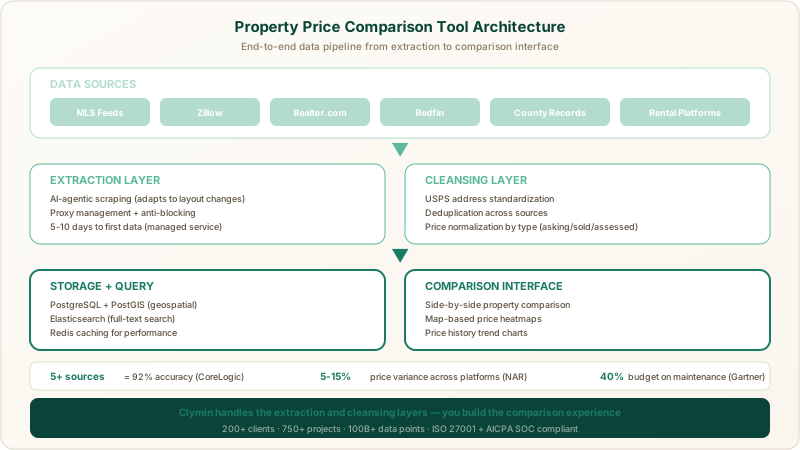
Property price comparison tools require a data architecture that handles high-volume ingestion, deduplication across sources, and fast query performance. The architecture decisions you make here directly impact how many properties you can compare and how quickly results load.
Database Selection
PostgreSQL with the PostGIS extension is the top choice for property comparison tools because it handles geospatial queries natively. Finding all properties within a 2-mile radius of a target address, calculating neighborhood boundaries, and mapping price gradients all require spatial indexing that PostGIS provides out of the box.
For teams processing more than 500,000 property records, consider a hybrid approach: PostgreSQL for structured query workloads and Elasticsearch for full-text search across property descriptions, agent notes, and neighborhood narratives.
Data Schema Design
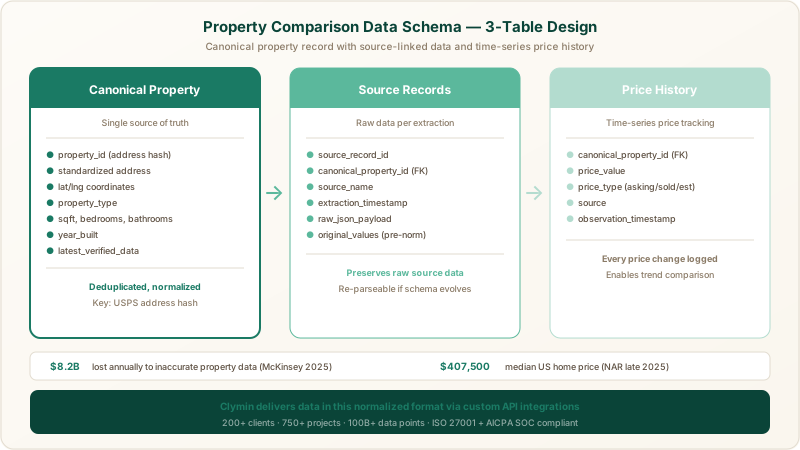
Design your schema around a canonical property record that acts as the single source of truth, with source-specific records linked to it:
Canonical property table: Stores the deduplicated, normalized version of each property. Key fields include a unique property ID (generated from address normalization), standardized address components, coordinates (latitude/longitude), property type, and the most recent verified data.
Source records table: Stores raw data from each extraction source, preserving the original values before normalization. Each record links to a canonical property and includes the source name, extraction timestamp, and raw JSON payload.
Price history table: Time-series table recording every price change observed across all sources. Fields include canonical property ID, price value, price type (asking, sold, assessed, estimated), source, and observation timestamp.
Clymin delivers data in this normalized format through custom API integrations, eliminating the need for clients to build their own parsing and normalization logic.
How to Build the Data Extraction Pipeline
The extraction pipeline is the most technically demanding component of a property price comparison tool. Property listing sites use dynamic JavaScript rendering, CAPTCHAs, IP-based rate limiting, and frequent layout changes to prevent automated access.
Option 1: Build Custom Scrapers
Building custom scrapers gives you maximum control but demands significant ongoing maintenance. A typical custom pipeline uses Python with Playwright or Puppeteer for JavaScript-rendered pages, rotating proxy pools to avoid IP blocks, and headless browser management for CAPTCHA-heavy sites.
Expect to dedicate 1-2 engineers full-time to maintenance alone. According to Gartner's 2025 Data Engineering report, organizations spend an average of 40% of their data engineering budget on maintaining extraction pipelines rather than building new capabilities. Layout changes on target sites can break scrapers overnight, requiring immediate fixes to prevent data gaps.
Option 2: Use a Managed Scraping Service
Managed scraping services like Clymin handle the entire extraction lifecycle: setup, proxy management, anti-blocking, layout change adaptation, and data delivery. Clymin's AI agents learn site structures and adapt automatically when layouts change, eliminating the maintenance burden that drains internal engineering teams.
The managed approach reduces time-to-first-data from 4-8 weeks (custom build) to 5-10 business days. For real estate comparison tools, this means you can start populating your database with multi-source property data within two weeks and focus engineering resources on the comparison UI and analytics layer instead.
Data Extraction Best Practices
Regardless of approach, follow these extraction practices for property data:
- Respect rate limits. Space requests at least 2-5 seconds apart per source to avoid overloading servers and triggering blocks.
- Capture full page context. Store raw HTML alongside extracted fields so you can re-parse historical data if your schema evolves.
- Implement incremental extraction. After the initial full crawl, only re-extract listings that changed since the last run. Monitor listing status, price, and description hash values to detect changes.
- Validate during extraction. Check that prices fall within reasonable ranges (filtering out $1 listings and $999,999,999 placeholder values), that addresses geocode successfully, and that required fields are present.
How to Cleanse and Normalize Property Data
Raw property data from multiple sources contains duplicates, formatting inconsistencies, missing values, and outright errors. The cleansing pipeline determines whether your comparison tool produces trustworthy results or misleading noise.
Address Standardization
Address standardization is the single most important cleansing step because it enables deduplication. The same property appears as "123 Main St Apt 4B" on Zillow, "123 Main Street, Unit 4B" on Realtor.com, and "123 Main St #4B" in county records.
Use the USPS Address Standardization API or Google Geocoding API to normalize addresses into a canonical format. After standardization, generate a deterministic hash from the normalized address components (street number, street name, unit, city, state, ZIP) to create your canonical property ID.
Price Normalization
Different sources report prices differently. MLS feeds may include agent commission assumptions. Zillow Zestimates blend algorithmic estimates with observed data. County assessments reflect tax-year valuations that lag market conditions by 6-18 months.
Label every price record with its type (asking, sold, assessed, estimated) and source. Display these labels in your comparison UI so users understand what they are comparing. A Zillow Zestimate and a recent sold price from county records serve fundamentally different purposes, and conflating them destroys user trust.
Deduplication Logic
After address standardization, match records across sources using a combination of normalized address hash, property type, and square footage (within a 5% tolerance). Properties that match on address but differ significantly on square footage or bedroom count may indicate data errors in one source, which should be flagged for review rather than merged automatically.
According to a 2025 McKinsey report on data quality in real estate, the industry loses an estimated $8.2 billion annually due to inaccurate property data. Automated cleansing pipelines that flag discrepancies rather than silently merging them produce significantly more trustworthy comparison results. Clymin's data cleansing and transformation service handles this normalization layer, delivering deduplicated datasets that are ready for direct ingestion into comparison tools.
How to Build the Comparison Interface
The frontend of your property price comparison tool transforms raw data into actionable insights. Design decisions here determine whether users find value quickly or abandon the tool in frustration.
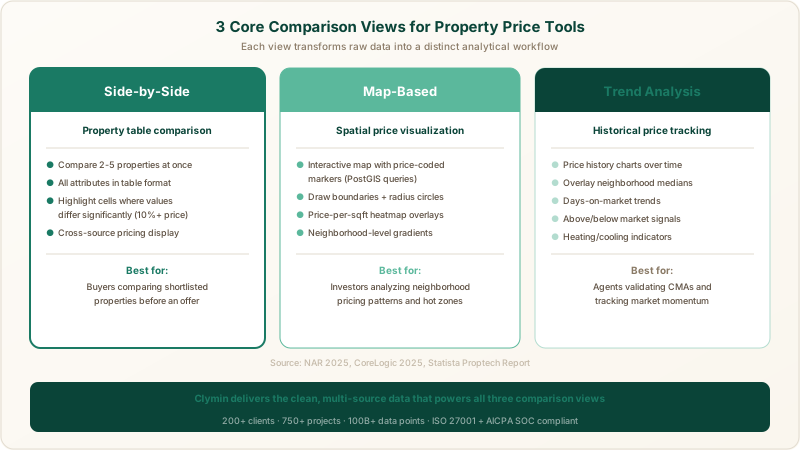
Core Comparison Views
Side-by-side comparison lets users select 2-5 properties and view all attributes in a table format. Highlight cells where values differ significantly (price variance above 10%, square footage difference above 15%) to draw attention to meaningful differences.
Map-based comparison plots properties on an interactive map with price-coded markers. Users draw boundaries around neighborhoods or radius circles around target addresses. Heatmap overlays showing price-per-square-foot gradients add immediate analytical value.
Trend comparison charts price history for selected properties over time. Overlay neighborhood median price trends to show whether individual properties are tracking above or below market. Include days-on-market trends to signal whether a market is heating up or cooling down.
Filtering and Search
Build filters for price range, property type, bedroom/bathroom count, square footage, lot size, year built, and geographic area. Implement saved searches with email alerts when new properties matching user criteria appear or when prices change on tracked properties.
Free-text search should cover addresses, neighborhoods, ZIP codes, and school district names. Back this with Elasticsearch for sub-second response times across datasets exceeding one million properties.
Performance Optimization
Property comparison queries can be expensive when scanning millions of records. Implement these optimizations:
- Materialized views for common comparisons (neighborhood medians, price-per-sqft averages) that refresh on a schedule rather than computing in real time.
- Redis caching for recently viewed property details and popular search result sets.
- Database partitioning by geographic region so queries scoped to a single city do not scan nationwide data.
- Pagination with cursor-based navigation instead of offset-based pagination, which degrades at scale.
How to Handle Data Freshness and Updates
Stale data is the fastest way to lose user trust in a property price comparison tool. A property that sold three days ago but still shows as active in your tool makes users question every other data point.
Update Scheduling Strategy
Segment your data sources by volatility and schedule updates accordingly. Active listings on major platforms should refresh daily at minimum, with hourly refreshes for high-velocity markets like San Francisco, Austin, and Miami. Closed sale records from county databases can refresh weekly. Property characteristics (square footage, lot size, year built) rarely change and need monthly verification at most.
Clymin's real-time crawling services support configurable refresh schedules per source, and you can learn more about optimal refresh frequencies for property data in our dedicated analysis.
Change Detection and Alerts
Implement a change detection layer that compares each new extraction against the previous version. Track these change types: price changes (increase or decrease), status changes (active to pending, pending to sold), new listings, and delisted properties.
Store change events in a dedicated changelog table and expose them through the UI as activity feeds. Users who track specific properties or neighborhoods receive notifications when meaningful changes occur.
Data Source Health Monitoring
Monitor extraction success rates per source. If Zillow extractions drop below 95% success rate, trigger an alert for investigation. Common causes include layout changes, new anti-bot measures, or infrastructure issues on the source site. Managed scraping services handle this monitoring and remediation automatically, which is a significant advantage over DIY extraction pipelines.
How to Validate Accuracy Across Sources
Cross-source validation is what separates professional-grade comparison tools from unreliable aggregators. When three sources show a property at $450,000 and one shows $525,000, your tool needs logic to identify and handle the outlier.
Statistical Outlier Detection
For each canonical property, calculate the median price across all sources. Flag any source-specific price that deviates more than 10% from the median as a potential outlier. Display outlier flags in the UI with an explanation: "Zillow estimate ($525,000) is 16.7% above the 3-source median ($450,000)."
Ground-Truth Anchoring
Anchor your accuracy benchmarks against county-recorded sale prices, which represent verified transaction values. For active listings where no sale has occurred, use the multi-source median as your best estimate and display the range (low to high across sources) alongside it.
Accuracy Metrics Dashboard
Track and display these metrics internally to monitor data quality over time: percentage of properties with data from 3+ sources, median cross-source price variance, extraction success rate per source, and average data freshness (hours since last update). Clymin has extracted over 100 billion data points across its client base, and the lessons from maintaining accuracy at that scale directly inform the validation frameworks recommended here.
How to Deploy and Scale the Tool
Deploying a property price comparison tool requires infrastructure that handles growing data volumes, concurrent users, and geographic expansion without degrading performance.
Cloud Infrastructure
AWS and GCP both support the required stack. A recommended production setup includes:
- Compute: Kubernetes cluster (EKS on AWS or GKE on GCP) running your API and extraction workers, with horizontal pod autoscaling based on query load.
- Database: RDS PostgreSQL with PostGIS (AWS) or Cloud SQL (GCP) with read replicas for query scaling. Start with a db.r6g.xlarge instance and scale vertically as data volume grows.
- Cache: ElastiCache Redis (AWS) or Memorystore (GCP) for query result caching and session management.
- Storage: S3 or GCS for raw extraction archives and image assets.
Cost Estimation
For a tool covering 500,000 active property records with daily updates from 5 sources:
| Component | Monthly Cost |
|---|---|
| Cloud infrastructure (compute, DB, cache) | $800-$1,500 |
| Data extraction (managed service) | $2,000-$5,000 |
| Geocoding API calls | $200-$500 |
| Monitoring and logging | $100-$300 |
| Total estimated | $3,100-$7,300 |
Costs scale roughly linearly with property count and source count. A nationwide tool covering 5 million+ properties will require 5-8x the infrastructure budget.
Scaling Strategy
Start with a single metro area (e.g., San Francisco or New York) to validate your data pipeline, cleansing logic, and UI before expanding. Geographic expansion introduces new data sources, local formatting quirks, and different regulatory considerations. Adding one metro area per month is a sustainable pace for most teams.
Ready to Power Your Property Comparison Tool With Clean Data?
Building a property price comparison tool demands reliable, structured data from multiple sources delivered on a consistent schedule. Clymin's AI-agentic scraping service extracts, cleanses, and delivers property data from any listing platform, county database, or rental site, so your engineering team can focus on building the comparison experience instead of maintaining scrapers. Contact us at contact@clymin.com or schedule a free consultation to discuss your property data requirements.